7 Smart Ways to Spot a Fake Android App Before Installing It
Installing an Android app can feel like a routine decision. You search for something you need, find a familiar-looking icon, read a few details and decide whether to install it. When the app appears to belong to a company or service you already know, it becomes even easier to assume that you have found the correct application.
How to Spot a Fake Android App Before Installing It
The problem is that appearance alone does not establish an app's identity. An unfamiliar or misleading app can sometimes use a similar name, icon or description to create confusion about who developed it or what it is connected to. This is why checking the details around an app can be more useful than relying only on what it looks like.
At the same time, not every unfamiliar app is dangerous. A legitimate application from a small developer may naturally have fewer downloads or reviews. A new app may also have little history simply because it has only recently been launched. These details should therefore be treated as clues rather than automatic proof that an app is fake.
Learning how to spot a fake Android app before installing it can help you make a more informed decision, especially when an unfamiliar application looks similar to one you already know.
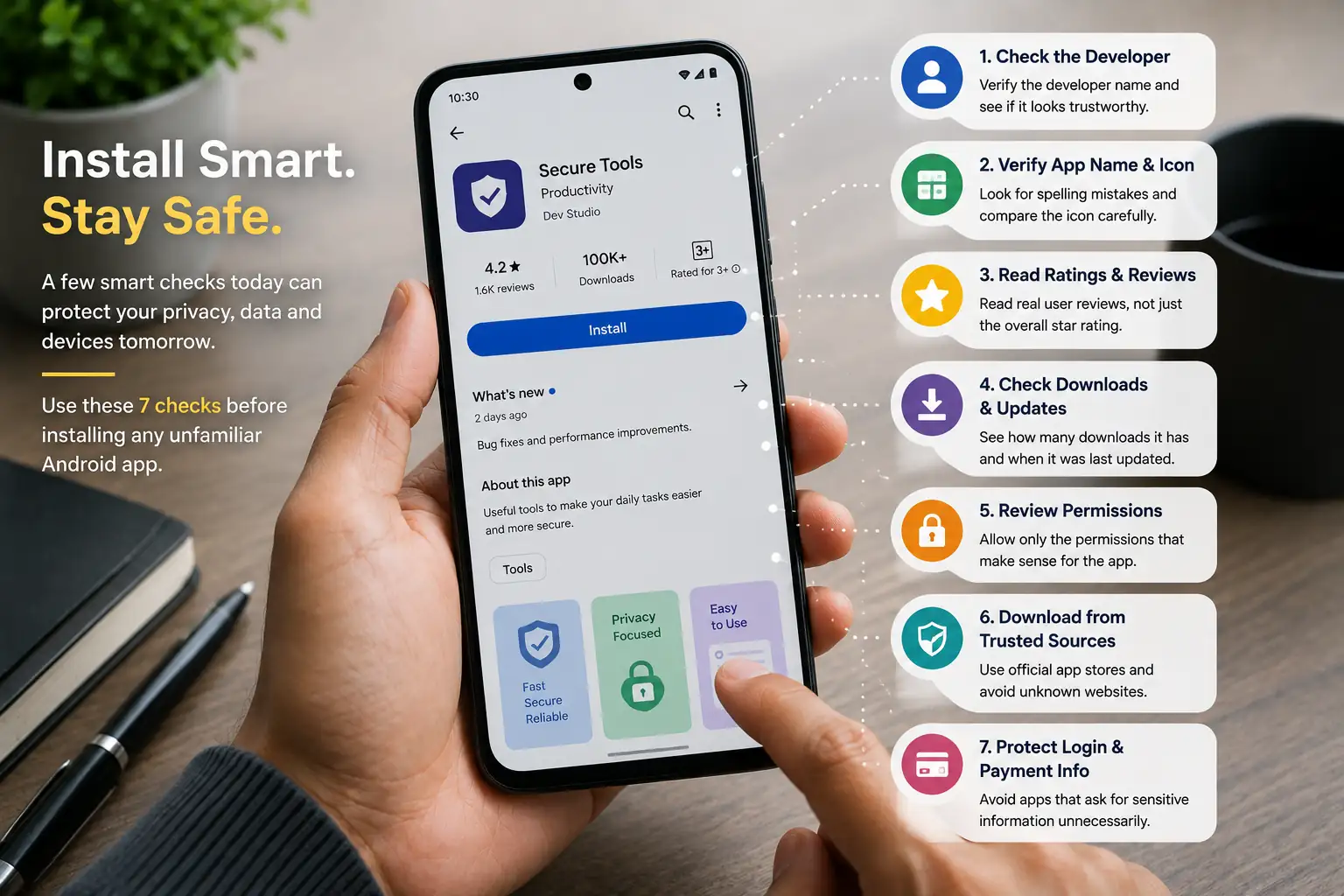
The better habit is to look at the whole picture. Before installing an unfamiliar app, consider who developed it, whether its identity makes sense, what users are saying, how it has been maintained, what permissions it requests and where you obtained it.
Google Play Gives You Useful Information
Google Play provides several details that can help users make a more informed decision before installing an app. The developer name, app description, reviews, download information and other listing details can all provide useful context. These details do not guarantee that an application is safe, but they give you more information to work with.
Android also provides built-in security features that can add another layer of protection. Google Play Protect can check applications and help identify potentially harmful software. This protection is useful, but it should work alongside sensible checking rather than replacing it.
If an application listing contains several details that do not make sense, there is still a good reason to pause and investigate. You do not have to decide immediately whether an app is definitely fake. You simply need to decide whether you have enough reliable information to feel comfortable installing it.
1. Check the Developer Name Carefully
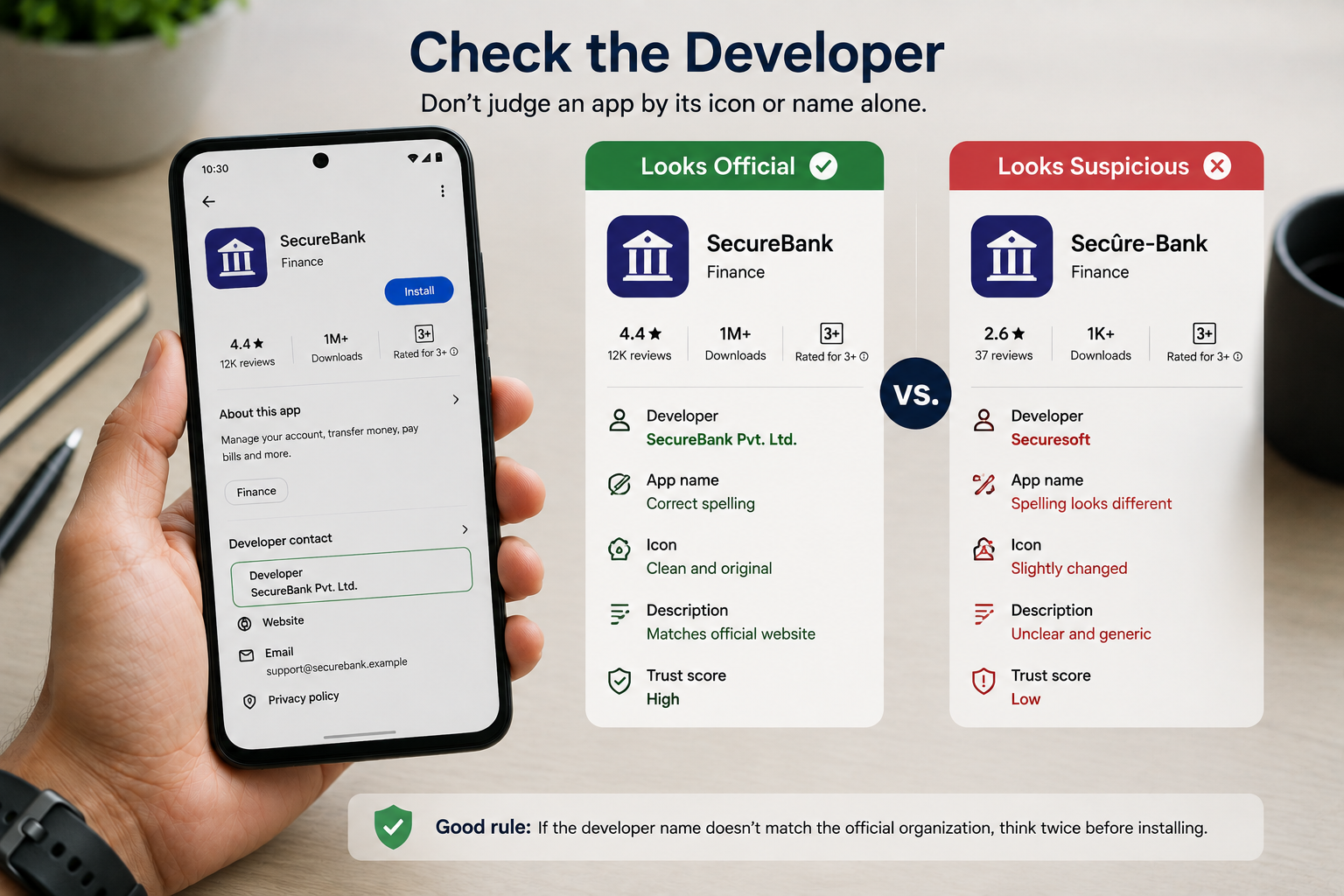
One of the simplest things you can check before installing an unfamiliar Android app is the developer name. One of the first steps to spot a fake Android app is checking who developed and published it. It is easy to focus on the app's title and icon while overlooking the organisation or person responsible for publishing it. That small line of information can sometimes help you distinguish an official application from one that is simply trying to look familiar.
This becomes especially important when you are searching for an app belonging to a bank, shopping service, streaming platform, government service or another organisation you already know. If you know which organisation operates the service, compare the developer information with what you would reasonably expect to see.
An unfamiliar developer does not automatically mean that an application is fake. Some legitimate companies publish apps through subsidiaries or development partners, while independent developers may have names you have never heard before. The useful question is whether there is a reasonable connection between the developer and the application.
If that connection is unclear, take a moment to investigate rather than installing the app simply because its name and icon look familiar.
Look for Small Differences in the Developer Name
Imitation does not always involve an identical name. Sometimes the difference can be as small as an extra word, unusual punctuation, slightly different spelling or a developer name that sounds similar to the organisation you were looking for.
These details can be easy to overlook during a quick search. If the app claims to represent a well-known company but the developer information does not appear to have any obvious connection to that company, treat the mismatch as a reason to investigate.
That does not prove that the application is fake. It simply means you should look for additional information before deciding.
Compare It With the Official Source
When you are looking for an app from a company you already use, one of the most useful checks is to start from that company's official website. Many organisations provide information about their official mobile applications, making it easier to confirm the correct app name and developer.
You can then compare that information with the Google Play listing. The app name, developer, branding and purpose should make sense together. If several details do not match, do not rely on the fact that the app appeared in your search results.
2. Look Carefully at the App Name and Icon
The app name and icon are usually the first things you notice when searching for an application. That familiarity can be useful, but it can also make you less careful. If you recognise a colour combination or logo shape, you may feel that you have already identified the correct application without checking the rest of the listing.
A suspicious application may try to take advantage of that habit by using a name, icon or visual style that resembles another application. The difference may be obvious in some cases, but it can also be surprisingly small. An extra word in the name, a slightly different spelling, a modified logo or a similar colour scheme can create confusion.
Check the Exact App Name
Start by reading the complete app name rather than relying on the first few words you recognise. When you are looking for a well-known application, compare the spelling carefully and look for unnecessary additions that make the name different from what you expected.
Words such as “official,” “original,” “pro,” or “premium” do not automatically make an application suspicious. Legitimate developers can use descriptive terms too. The important question is whether the complete name makes sense for the service you are trying to find.
If two applications have almost identical names, do not simply choose the one that appears first. Go back to the developer information, description and other details you have already checked.
Do Not Trust an Icon Just Because It Looks Familiar
An app icon can create a powerful first impression. If you recognise a familiar colour combination or logo shape, you may assume that you have found the correct application. But an icon by itself does not establish who created the app or whether it has a legitimate connection to the organisation it appears to represent.
Look carefully for small differences. A logo may have a slightly different shape, a different letter, an altered colour or an additional symbol. These differences do not automatically prove anything, but they can tell you that it is worth checking the rest of the listing.
Compare the App With the Official Branding
If you are trying to find an application belonging to a company you already use, compare the app's name and icon with information shown on the company's official website. Look at the overall branding rather than focusing on one tiny detail.
Does the name match? Does the logo look consistent? Does the description talk about the same service? Does the developer information make sense? When several details agree, you have a stronger basis for believing that you have found the intended application.
3. Read the Reviews, but Do Not Trust Them Blindly
Reviews can be useful, but they are also easy to misunderstand. A high star rating may make an application look trustworthy at first glance, yet the overall number does not tell you why people rated it highly or whether those experiences are still relevant. Reviews can also help you spot a fake Android app, but they should never be your only check.
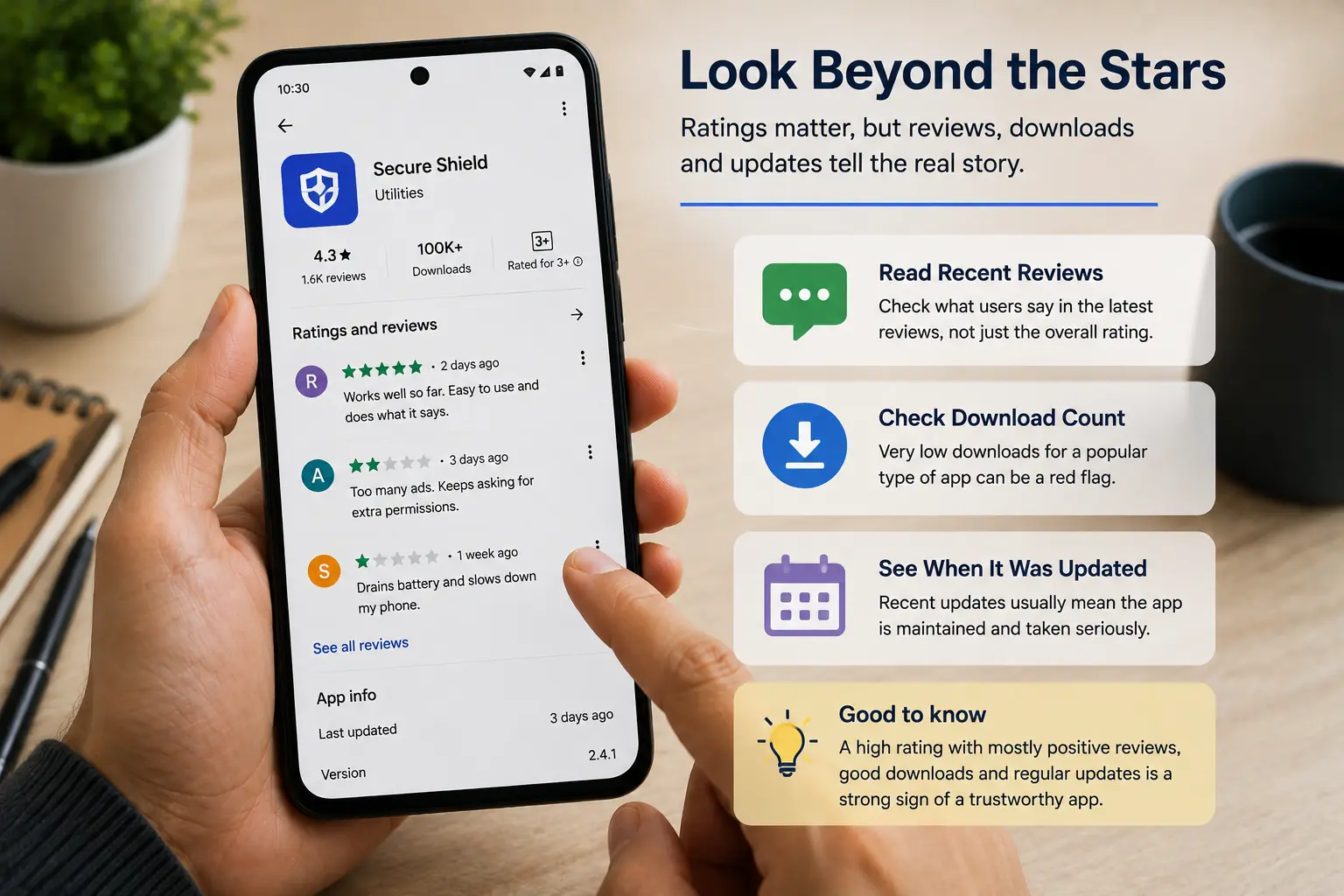
Start with recent reviews rather than looking only at the overall rating. An application can change significantly after updates, and the current version may offer a different experience from the one users reviewed months or years ago.
At the same time, do not assume that a few negative reviews automatically mean that an application is fake. Genuine applications can have bugs, compatibility problems or users who simply dislike certain features. The more useful question is whether you can see a consistent pattern in the feedback.
Look for Specific Experiences
Useful reviews usually explain what actually happened rather than simply saying that an app is “great” or “bad.” A person might describe a problem after an update, explain that a feature does not work, or mention an unexpected request made by the application.
When reading reviews, focus on comments that relate directly to the way you intend to use the app. If you are considering a payment or shopping application, comments about login or transaction problems may be more relevant than general comments about design.
You should also look for recurring experiences. One unusual complaint may be isolated, while many recent users describing similar problems can give you a stronger reason to investigate.
Do Not Assume Every Positive Review Is Meaningful
A long list of positive reviews can create confidence, but the quality of those reviews matters too. Very short comments that provide no useful information tell you little about how the application actually works.
This does not mean that you should try to decide whether every review is genuine. That is not something an ordinary user can reliably establish just by reading a few comments. Instead, use reviews as one source of information and compare them with the developer information, description, update history and other details.
4. Check Downloads, Updates and App History
The number of downloads can provide useful context, but it should never be treated as proof that an application is genuine or safe. A popular application may have millions of downloads, while a legitimate new application may have only a small number because it has not been available for long.
Instead of asking whether an app has “enough” downloads, consider what the number tells you alongside other information. If an application has been available for some time, has a reasonable user base, receives updates and has a consistent history, those details can help you understand it better.
Check When the App Was Last Updated
The update information can tell you whether an application appears to be actively maintained. Regular updates may indicate that the developer continues to work on the app, fix problems or adapt it to changes in Android.
However, an old update date does not automatically mean that an application is fake. A simple application may not require frequent changes. What matters is whether the update history makes sense for the type of application you are looking at.
Look at the App's History
An application with an understandable history can sometimes be easier to evaluate than one that provides very little information. Look at its reviews, updates, developer information and overall presence to understand whether the listing appears consistent.
This does not mean that an older application is automatically trustworthy. The purpose of checking history is simply to understand the context rather than judging the app from one screen.
Do Not Chase the Biggest Download Number
Large download figures can create a strong impression of popularity, but popularity and safety are not the same thing. People install applications for many reasons, and download counts do not tell you whether every user had a positive experience.
This is especially important when comparing applications with similar names. Before choosing the one with the biggest number, make sure its developer, branding and purpose actually match the application you intended to install.
5. Check the Permissions Before Installing
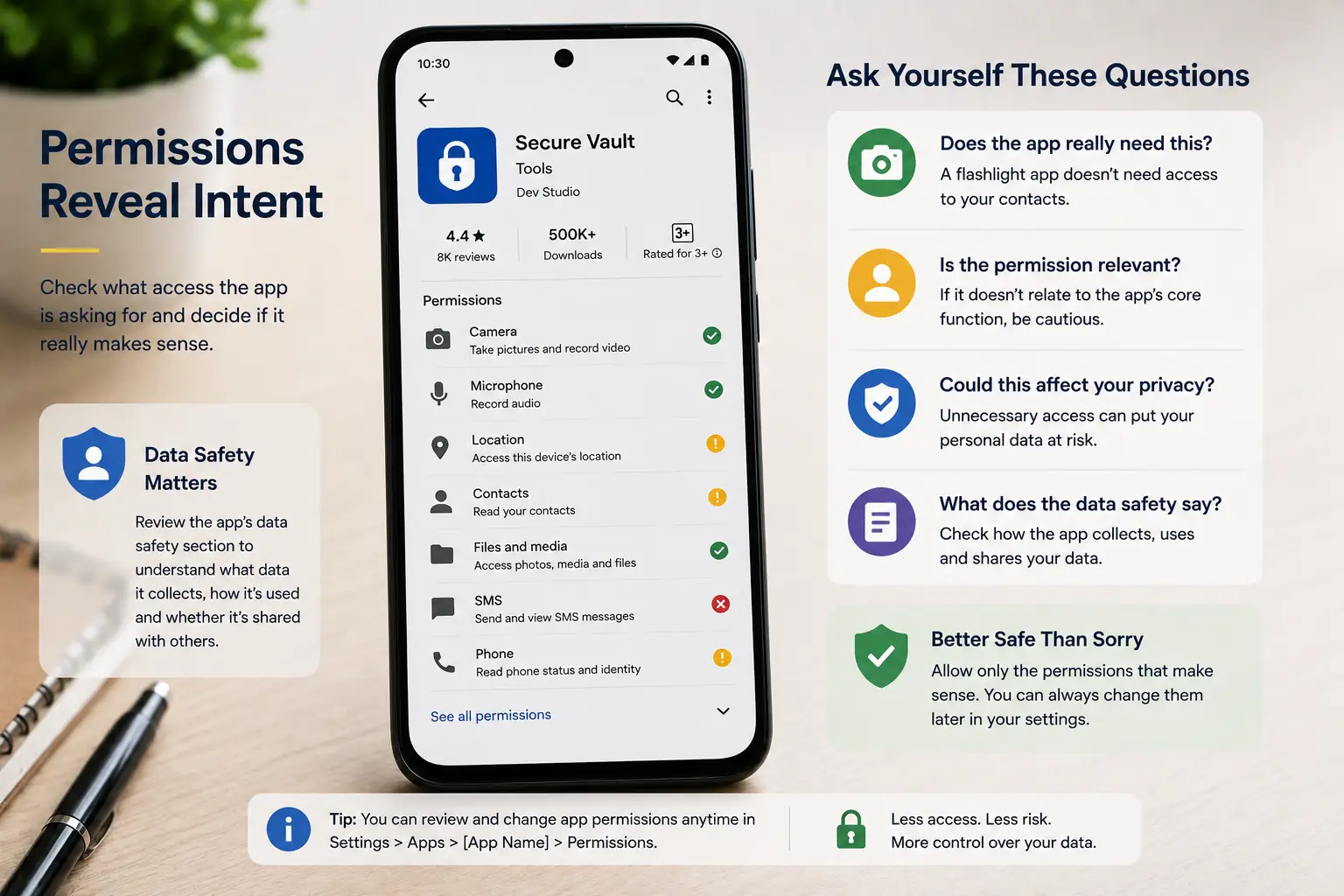
App permissions are one of the most useful things to examine before installing an unfamiliar Android application. When you install an app, it may ask for access to parts of your phone such as the camera, microphone, contacts, location or files. Permissions can provide another useful clue when you are trying to spot a fake Android app before installation.
The important question is whether the requested access actually makes sense for what the app is supposed to do. A navigation application may reasonably need location access, while a video-calling app may need the camera and microphone. These requests are not suspicious simply because they involve sensitive device features.
Understand What the Permission Allows
You do not need to understand every technical security term to make a sensible decision. What matters is having a general idea of what access you are giving the application and whether that access is necessary for the feature you want to use.
If you are unsure why an application needs a particular permission, take some time to understand the request before approving it.
Be Careful With Unrelated Access
A permission deserves more attention when it appears unrelated to what the application is supposed to do. That does not automatically mean that the application is fake or malicious, because some features may depend on permissions that are not immediately obvious.
However, if an app has a simple purpose but asks for several types of access that seem unrelated, combine that information with what you already know about the developer, reviews and app history.
Review Permissions Before Giving Access
When an app asks for permission, do not feel that you have to approve it immediately just to continue. Read what the application is asking for and consider whether you are comfortable providing that access.
It is also worth reviewing permissions after an application has been installed, particularly after a major update or when the app introduces new features.
Check the Data Safety Information Too
Permissions are only one part of understanding how an application handles information. Where available, the app's Data safety information can provide additional context about the types of data the developer says the application collects or shares.
Read this information with the same mindset you use for permissions. Understand what the app says it needs and consider whether that makes sense for its purpose.
For a broader look at how technology can quietly influence everyday life, explore The Invisible Technology That Controls More of Your Life Than You Realize.
6. Be Careful With Apps From Outside Google Play
Not every Android application comes from Google Play. You may come across an APK through a website, a message, a forum, social media or a link shared by someone else. Knowing where an APK came from can also help you spot a fake Android app before you install it.
Installing an application this way can sometimes be useful, particularly when a legitimate application is unavailable through the usual store. But it also means that you need to take more responsibility for checking where the file came from.
An APK is simply the package used to install an Android application. The file format itself does not mean that an app is fake or harmful. The important issue is the source and circumstances surrounding the download.
Think About Where the APK Came From
Before downloading an APK, consider how you arrived at the website or download link. If you deliberately visited a developer's legitimate website and the developer provides the application there, you have more information about the source than you would from an unfamiliar download page.
Be especially careful when a website promises something unusually attractive, such as a paid application being offered for free, a modified version with premium features unlocked or an unofficial version claiming to provide features unavailable elsewhere.
Be Careful With Links Shared in Messages
A suspicious app does not always begin with a search. You might receive a message telling you to install an application to claim an offer, track a delivery, access a document or complete another task.
When a message creates urgency, it can be tempting to tap the link without checking where it leads. Take a moment to verify the claim independently through the relevant company's official website or existing application.
Do Not Turn Off Security Just to Install an App
Sometimes an unfamiliar application may tell you that you need to change a security setting before installation can continue. This should be treated as a reason to pause and understand what you are being asked to do.
If you are being encouraged to weaken a security feature simply to install an application, ask yourself whether the application is worth taking that additional risk.
Check the Developer's Website When Possible
If you genuinely need an app that is not available through Google Play, look for information from the developer itself. A legitimate developer may provide installation instructions, explain why the application is distributed separately and identify the official download location.
Compare the name of the application, developer information and version details with what you already know.
An APK Is Not Automatically a Fake App
It is worth making this distinction clear because the word “APK” can sometimes create unnecessary fear. APK is the standard Android application package format, and legitimate applications can be distributed outside Google Play for valid reasons.
The concern is not the file format itself. The concern is whether you know where the file came from, who created it and whether you have a reasonable basis for trusting it.
7. Check Before You Sign In, Pay or Share Personal Information
Installing an app is only the first step. The more important question often comes later, when the application asks you to create an account, sign in, enter payment details or provide personal information.
At that point, an app that looked harmless during installation can suddenly have access to information that matters much more than the app itself.
Before entering anything sensitive, stop and think about what the application is asking you to provide and why it needs that information. A shopping application may reasonably need account and payment information when you make a purchase, while a simple utility app should not need the same level of personal information just to perform a basic task.
Be Careful With Login Screens
A familiar-looking login screen can create a false sense of security. If an unfamiliar application asks you to enter the password you normally use for another important service, do not assume that the request is legitimate simply because the screen looks professional.
If you are trying to access a particular company's service, verify the application through the company's official website or another trusted source before entering your credentials.
Think Before Entering Payment Details
Payment information deserves an additional level of caution because mistakes can have financial consequences. If an unfamiliar application suddenly asks for card details, banking information or another payment method, make sure you understand what you are paying for and why the application needs the information.
Look at the app's identity again before continuing. Does the developer match the service? Does the purpose make sense? Were you expecting to make a payment at this stage?
Be Careful With Personal Information
Not all sensitive information is financial. Your phone number, email address, location, contacts, photographs and other personal details can also be valuable.
Before providing information, consider whether the application actually needs it to perform the feature you want. If an app has already raised concerns and then asks for sensitive information, that combination deserves extra attention.
If you want to understand how everyday online activity can create a lasting trail of information, you can also read Why Every Click Leaves a Digital Shadow You Never See.
Verify Before Trusting an Unexpected Request
If an app suddenly tells you that you need to verify your account, make a payment or provide additional information, consider checking the request through another trusted channel.
If you already have the company's official website or application, use that instead of following an unexpected instruction from an unfamiliar app.
Warning Signs That Should Make You Stop
By now, you have seen seven different things worth checking before installing an unfamiliar Android app. Each one provides a small piece of information, but the real value comes from looking at them together.
A slightly unusual developer name may have a reasonable explanation, just as a small number of downloads may simply mean that an app is new. The situation becomes more concerning when several unrelated details begin pointing in the same direction.
The App Seems to Be Imitating Another App
Be especially careful when an application appears to copy the identity of a service you already know. A similar name, almost identical icon, copied description or branding that creates confusion can be a reason to stop and verify the listing.
If you were looking for a particular company's application, go back to a trusted source and confirm the correct app instead.
The Developer and App Identity Do Not Match
An unfamiliar developer does not automatically make an app suspicious, but an unexplained mismatch deserves attention. If an app claims to represent a well-known organisation while the developer information appears unrelated, understand that relationship before continuing.
The Permissions Do Not Make Sense
An unexpected permission request can be another reason to pause. The important question is not whether an app asks for permissions, because legitimate applications often need access to certain device features.
Instead, consider whether the requested access has a clear connection with what the app is supposed to do.
The App Creates Unnecessary Urgency
Be cautious when an application or the link that led you to it tries to make you act immediately. Messages telling you that an account will be closed, a payment must be made immediately or an offer will disappear can make it harder to stop and think.
Urgency does not automatically prove that an app is fake. The important thing is whether you can independently verify the request.
The Download Source Is Unclear
If you cannot confidently explain where an APK came from or who provided it, that is a good reason not to continue.
A legitimate developer may distribute an application outside Google Play, but you should still be able to establish a reasonable connection between the developer, the application and the download location.
The App Wants Sensitive Information Too Quickly
An application asking for a login, payment or personal information is not automatically suspicious. Many legitimate services need these details.
The concern arises when the request seems unexpected, excessive or unrelated to what you are trying to do.
Several Small Problems Appear Together
One unusual detail does not necessarily mean an app is fake. A new app can have few downloads, an independent developer can have an unfamiliar name and a legitimate application can occasionally request a permission you did not expect.
The situation changes when several of these details appear together. For example, an unfamiliar developer, a nearly identical app name, unusual reviews, an unclear download source and unrelated permission requests create a stronger reason to stop.
What to Do If You Already Installed a Suspicious App
Realising that an app may not be what you expected can be unsettling, but there is no need to panic or start making random changes to your phone. The first step is to stop using the app until you understand what is happening.
If you have only just installed the app and have not used it, the situation may be simpler than you think. You can review the app's information and permissions, and if you decide that you do not trust it, uninstalling it may be an appropriate next step.
Review What the App Was Allowed to Access
Before removing a suspicious application, it can be useful to look at the permissions you granted it. This gives you a better idea of what information or device features the application may have been able to access.
Android's settings allow you to review permissions for installed applications and make changes where appropriate.
Uninstall the App If You Do Not Trust It
If you have decided that an application is suspicious and you do not need it, uninstalling it removes the app from normal use on your device.
After uninstalling it, check your device to make sure the application is no longer present and review your installed apps if necessary.
Change Important Passwords If You Entered Them
If you entered a password into an application that you now believe may be suspicious, consider changing that password through the legitimate service rather than through the suspicious application.
If you reused the same password for more than one service, those other important accounts should also be reviewed and secured with unique passwords.
Take Extra Care If Payment Information Was Involved
If you entered card details, banking information or other payment-related information into an app that you now suspect, treat the situation more seriously.
Do not make additional payments through the app while you investigate. Instead, contact the relevant bank, card provider or payment service through its official contact method and explain the situation.
Run a Security Check
Android's built-in security features can provide another useful check after you have identified an application that concerns you. Google Play Protect can scan installed applications and is designed to identify potentially harmful software, including apps obtained from outside Google Play.
Make sure your phone and security features are up to date, and follow any warnings or recommendations presented by the device.
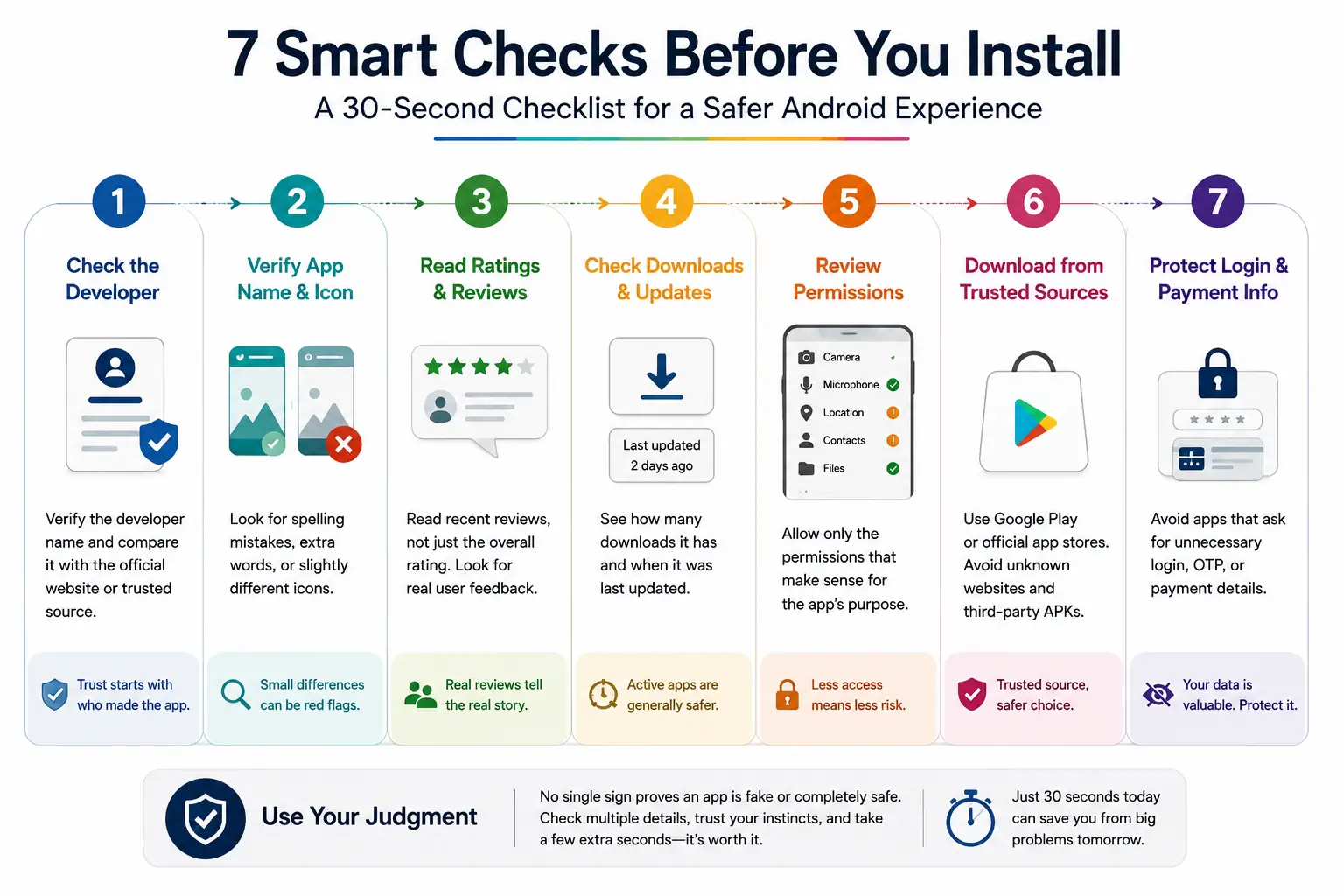
A Simple 30-Second Checklist to Spot a Fake Android App
You do not need to spend half an hour researching every application you install. For an unfamiliar app, a short check can often give you enough information to decide whether you should continue or take a closer look.
Start with the developer and app identity. Make sure the developer name makes sense for the application and that the app name, icon and description match what you were actually looking for.
Next, look at the reviews, downloads and update information. Read a few recent reviews instead of relying only on the star rating, and consider whether the application's history makes sense.
Then check the permissions and data-related information before giving the application access to your phone. Ask yourself whether the permissions make sense for what the app is designed to do.
Finally, think about where the app came from and what it asks you to do after installation. Be more careful with APK files from unfamiliar websites, unexpected links or messages, and stop if an app suddenly pressures you to provide a password, payment information or sensitive personal details.
Your Quick Pre-Install Check
Developer → Name & Icon → Reviews → Downloads & Updates → Permissions → Source → Login or Payment
This sequence does not guarantee that every app you install will be completely safe. It is simply a practical way to slow down and notice obvious inconsistencies before you give an unfamiliar application access to your phone or personal information.
Common Mistakes People Make When Installing Android Apps
Even when people know that suspicious apps exist, it is easy to make a poor decision when they are in a hurry. Most mistakes do not happen because someone lacks technical knowledge. They happen because the app looks familiar, the installation seems convenient or the person assumes that someone else has already checked it.
Assuming Google Play Means Every App Is Automatically Safe
Google Play provides important protections and has policies for developers, but its presence alone should not become a reason to stop paying attention.
Users should still look at the developer, app details, reviews, permissions and other information before installing an unfamiliar application.
Choosing an App Only Because It Has a High Rating
A high rating can be useful, but it should not be the only factor behind your decision. An overall rating does not tell you whether the reviews are recent, what users actually experienced or whether the application has changed.
Take some time to read recent and relevant reviews before installing an unfamiliar application.
Installing the First Familiar-Looking Result
Search results can contain several applications with similar names, especially when you are looking for a popular service.
Before tapping Install, compare the developer name, app name, icon and description. If you are looking for an official application, checking the organisation's own website can provide another way to confirm which listing you should use.
Ignoring Permissions Because You Want the App to Work
It is tempting to approve every permission request simply because you want to start using an application. Instead, consider whether the requested access makes sense for the app's purpose and whether you are comfortable providing it.
If you are unsure why the application needs a particular type of access, take a moment to understand the request before approving it.
Downloading APKs From Random Websites
An APK is not automatically dangerous, but downloading one from an unknown or unverified source creates an additional reason to be careful.
Before installing an APK, consider whether you know who provided it and whether you can independently connect the file to the legitimate developer.
Entering Sensitive Information Without Checking the App
Another common mistake is to focus so much on getting the application working that the login or payment stage receives no additional attention.
Before entering a password, payment details or other personal information, check that you are using the application you actually intended to use.
Treating One Warning Sign as a Final Verdict
Seeing one unusual detail does not automatically prove that an application is fake. A new app can have few downloads, an independent developer can have an unfamiliar name and a legitimate application can occasionally request a permission you did not expect.
The more useful approach is to consider the complete picture. When the developer, identity, reviews, history, permissions and source all make reasonable sense, one unusual detail may have an innocent explanation.
As technology increasingly influences the choices people make, understanding where human judgement still matters is becoming more important. You can explore this wider question in When Technology Starts Making Decisions: Are Humans Losing the Final Say?
Key Takeaways
- Spotting a suspicious Android app is less about memorising a complicated security formula and more about developing a consistent habit.
- Before installing something unfamiliar, look at who developed it, whether the name and icon make sense, what users are saying, how established the app appears to be, what permissions it requests and where you obtained it.
- The most important lesson is that no single detail should decide everything. A small number of downloads does not automatically make an app fake, just as a high rating does not automatically make it trustworthy.
- If an application also asks for sensitive information, payment details or access that seems unrelated to its purpose, slow down and verify it before continuing. You always have the option to stop, find the official source or choose another application that gives you greater confidence.
Frequently Asked Questions
Start by checking the developer name, exact app name, icon and description, especially when you are looking for an official app from a company you already know. Then look at recent reviews, downloads, update information and permissions to see whether the overall listing makes sense.
Google Play provides important protections and Google Play Protect adds another layer of security, but users should still make sensible checks before installing unfamiliar applications. Looking at several details together gives you a more informed basis for deciding whether an app is suitable for you.
Start by looking at the developer name shown on the app listing and consider whether it makes sense for the application you are trying to install. If the app claims to belong to a company or service you already use, compare the information with that organisation's official website or another trusted source.
An APK is the standard Android application package format, so the file format itself does not mean that an app is fake. The important question is where the APK came from and whether you can establish a reasonable connection between the file, the developer and the website providing it.
Stop using the app until you understand what happened, and avoid entering additional passwords, payment details or personal information into it. Review the permissions you gave the application and consider uninstalling it if you do not trust it.
No. Download numbers provide useful context, but they are not proof that an application is genuine or appropriate for you. Consider downloads together with the developer, reviews, update history and other details before making your decision.
Not necessarily. Some suspicious applications may look convincing enough that a quick glance does not reveal anything unusual. That is why it is better to use several checks rather than searching for one obvious sign.
Continue Your Technology Journey
Building stronger digital awareness begins with understanding how everyday technology handles our information, influences our decisions, and creates traces that can remain beyond the moment we use an app. These related DivyalVision articles explore digital footprints, invisible technology, technology-driven decisions, and the wider questions that come with living in an increasingly connected world:
- 📖 Why Every Click Leaves a Digital Shadow You Never See – Explore how everyday online activity can create a lasting digital trail and understand why the information connected to ordinary clicks, searches and interactions deserves greater awareness. Read the article
- 📖 The Invisible Technology That Controls More of Your Life Than You Realize – Understand how technology can quietly influence everyday experiences and decisions, often working in the background without users noticing how much it shapes their digital lives. Read the article
- 📖 When Technology Starts Making Decisions: Are Humans Losing the Final Say? – Explore the growing role of technology in decision-making and consider where human judgement still matters as digital systems become increasingly involved in everyday choices. Read the article
Final Thoughts
A fake or misleading app does not always announce itself clearly. Sometimes the warning sign is a developer name that does not make sense, sometimes it is an unusual permission request, and sometimes the problem only becomes noticeable when the app asks for a password or payment information.
That is why the safest approach is not to depend on one test, but to build a simple habit of checking several details before you trust an unfamiliar application. You do not need to become a cybersecurity expert to spot a fake Android app.
You do not need to become a cybersecurity expert to make better decisions about the apps you install. Taking a little time to check the developer, app identity, reviews, history, permissions and source can help you recognise situations that deserve more attention.
If something still does not feel right after those checks, you can always stop and look for a more trustworthy alternative.
Before you tap Install, take a moment to know what you are installing, who is behind it and what access you are giving it.