Why Every Click Leaves a Digital Shadow You Never See
Every time you unlock your phone, search for an answer, read a news article, watch a video, shop online, or simply visit a website, you leave behind something invisible. It cannot be seen on your screen, carried in your pocket, or erased with a single tap. Yet it quietly grows with almost every digital action you take. This invisible record is often called your Digital Shadow.
Unlike footprints left in sand, digital traces rarely disappear on their own. Instead, they become small pieces of information connected across websites, applications, devices, and online services. Individually, a single search or website visit may seem insignificant. Together, however, these countless interactions gradually build a detailed picture of habits, interests, preferences, and online behavior.
Most people never intentionally create this digital record. They are simply browsing the internet, checking directions, reading emails, comparing products, or scrolling through social media. Behind these familiar activities, however, many digital systems quietly record technical information that helps websites remember users, improve services, strengthen security, and personalize experiences.
The remarkable part is that much of this process happens automatically. People rarely receive notifications explaining how many digital traces have been created during a normal day. A few hours of internet use can generate hundreds of small interactions between browsers, websites, applications, advertising platforms, analytics services, and cloud systems all working silently in the background.
Understanding your Digital Shadow does not mean becoming suspicious of every website or avoiding technology altogether. Modern digital services depend on data to function efficiently. Navigation applications need location information to calculate routes, online stores remember shopping carts, streaming platforms recommend entertainment, and banking systems monitor unusual activity to protect customers. These conveniences exist because information flows continuously between users and digital services.
The real challenge is not the existence of a digital shadow but the lack of awareness surrounding it. Once people understand how digital information is created, stored, and shared, they become better equipped to make informed decisions about privacy, security, and responsible technology use.
What Creates Your Digital Shadow?
Many people imagine that digital information is collected only when they register for a website or complete an online purchase. In reality, a Digital Shadow begins forming much earlier and grows through hundreds of everyday activities that often appear completely ordinary.

Opening a website sends technical information about your browser and device. Searching for a nearby restaurant creates location-based requests. Watching a video records viewing preferences. Clicking a product link may generate advertising data. Signing into an application confirms your digital identity. Even closing a webpage can trigger background communication between your browser and multiple online services.
Most of these interactions exist to improve user experience rather than invade privacy. Websites remember language preferences, shopping platforms save wish lists, and email services recognize trusted devices to improve account security. At the same time, every interaction contributes another small piece to your growing digital presence.
Unlike physical records stored in a single location, your Digital Shadow is distributed across many different digital systems. Search engines, cloud platforms, websites, mobile applications, online retailers, financial services, and social media platforms may each hold different fragments of information created through normal online activity.
This explains why the digital world often feels surprisingly personalized. News websites display stories based on previous reading habits. Online stores recommend products similar to recent searches. Video platforms suggest content aligned with viewing history. None of these experiences happen by accident. They are the result of thousands of small digital interactions gradually shaping personalized online experiences.
Why Most People Never Realize It Exists
One reason the Digital Shadow remains largely unnoticed is that it is almost never visible to the user. Unlike downloading a file or sending an email, background tracking happens automatically. There are no flashing warnings or daily summaries showing how many digital traces were created during an online session.
This invisible nature creates a false sense of simplicity. The internet feels effortless because complex systems quietly exchange information behind the scenes. As technology has become more seamless, the processes that support it have become increasingly hidden from everyday users.
The result is a modern digital environment where millions of people generate extensive digital records every single day without ever realizing how much information accompanies even the simplest online action.
Active vs Passive Digital Footprints
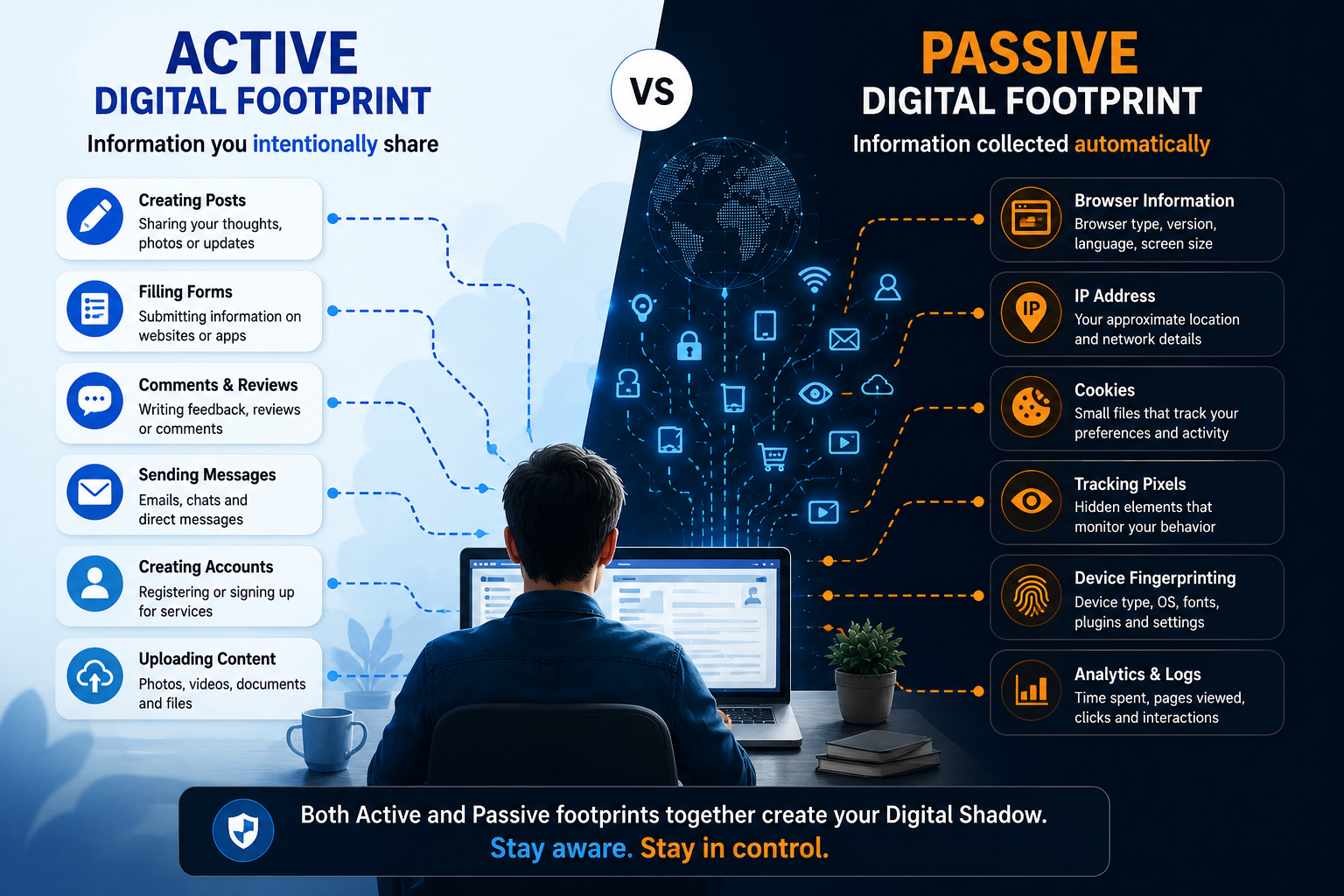
Not every piece of information online is collected in the same way. Some details are shared deliberately, while others are generated automatically as you interact with digital services. Understanding this distinction is one of the first steps toward understanding how your Digital Shadow grows over time.
Experts generally describe digital footprints as active and passive. Both contribute to your online presence, but they are created differently and serve different purposes.
| Active Digital Footprint | Passive Digital Footprint |
|---|---|
| Creating social media posts | Browser information |
| Filling online forms | Device type detection |
| Writing product reviews | IP address logging |
| Uploading photos | Cookie data |
| Sending emails | Website analytics |
| Commenting on articles | Session tracking |
| Registering for services | Background security checks |
An active footprint is easier to recognize because you knowingly provide the information. Every account you create, photo you upload, comment you write, or profile you complete becomes part of your digital identity.
Passive footprints are less obvious. Simply opening a webpage may allow the website to identify your browser version, screen size, operating system, language settings, approximate location, and browsing session. Most of this information is collected automatically so websites can function correctly, improve performance, prevent fraud, and enhance user experience.
Neither type is inherently harmful. Problems usually arise when people remain unaware of how much information is being generated or how different pieces of data can be combined over time to create an increasingly detailed digital profile.
How Websites Know More Than You Expect
Imagine walking into your favorite neighborhood café where the owner already remembers your usual order. Websites attempt something similar—not because they know you personally, but because they recognize patterns from previous visits.
When you visit a website, your browser exchanges small amounts of technical information before the page even finishes loading. This communication helps determine whether the site is compatible with your device, which language should be displayed, whether you're already logged in, and how content should be presented.
As the session continues, additional information may be generated. The pages you visit, the time spent reading an article, the buttons you click, and whether you return later all help websites understand how visitors interact with their content. Businesses often analyze this information to improve navigation, identify popular topics, optimize website performance, and fix technical issues.
For users, these improvements usually appear as smoother experiences. Pages load faster, previously viewed items remain accessible, and preferences are remembered between visits. Behind these conveniences, however, your Digital Shadow quietly expands through dozens of small technical interactions that happen automatically.
Importantly, reputable websites typically explain many of these practices through privacy policies and cookie consent banners. Understanding these notices helps users make informed choices about how their information is used rather than accepting every request without reading it.
Cookies: Small Files With a Big Role

Among the most familiar tracking technologies are cookies—small text files stored by your browser to remember useful information between visits. Despite their simple name, cookies play an important role in making today's internet convenient and efficient.
Without cookies, many everyday online activities would become frustrating. Shopping carts would empty whenever a page refreshed, websites would repeatedly ask users to log in, and language preferences would need to be selected during every visit. Cookies help create continuity by remembering information that improves usability.
However, not all cookies serve the same purpose. Some are essential for website functionality, while others support analytics or advertising. Understanding the differences allows users to make better privacy decisions.
| Cookie Type | Primary Purpose |
|---|---|
| Essential Cookies | Enable website functionality and security |
| Preference Cookies | Remember language and display settings |
| Analytics Cookies | Measure visitor behavior and website performance |
| Advertising Cookies | Help deliver more relevant advertisements |
The growing focus on digital privacy has encouraged many websites to give users greater control over cookie preferences. Consent banners now allow visitors to accept only essential cookies or customize which categories they are comfortable sharing.
Choosing these settings thoughtfully does not eliminate your Digital Shadow, but it does provide greater transparency and control over how certain types of information are collected.
Browser Fingerprinting: Recognition Without Cookies
Even if cookies are limited or deleted, websites can sometimes recognize devices using techniques known as browser fingerprinting.

Rather than storing information on your device, browser fingerprinting observes characteristics that already exist, such as screen resolution, browser version, operating system, installed fonts, language preferences, and hardware settings. Individually, these details reveal very little. Combined, they can create a distinctive technical profile that helps distinguish one device from another.
Browser fingerprinting has legitimate uses, particularly in fraud prevention and cybersecurity, where identifying suspicious devices helps protect accounts from unauthorized access. At the same time, privacy researchers continue exploring ways to balance security needs with greater user privacy and transparency.
Understanding browser fingerprinting reminds us that the internet relies on more than visible interactions. Much of what shapes your Digital Shadow happens quietly through technical processes that most users never notice but that keep modern digital services functioning securely and efficiently.
The Business Behind Your Personal Data
Every search, product view, app installation, or website visit creates information that has value far beyond the moment it is generated. In today's digital economy, data has become one of the most valuable resources because it helps organizations understand how people use online services, improve customer experiences, strengthen security, and make informed business decisions.
Most reputable companies do not simply collect information for the sake of collecting it. Instead, they analyze trends. For example, an online retailer may study which products receive the most attention during a holiday season, while a streaming platform may examine viewing habits to recommend content that matches a user's interests. These insights help improve services and make digital experiences more relevant.
However, the digital ecosystem is much larger than the websites people visit directly. Advertising networks, analytics providers, cloud services, payment processors, and various technology partners may all play a role in supporting a single website. As information moves between these systems, your Digital Shadow gradually expands across multiple digital platforms.
This interconnected environment explains why advertisements sometimes appear related to recent searches or why recommendations become increasingly personalized over time. While personalization can improve convenience, it also highlights the importance of understanding how personal information is collected, processed, and shared.
The goal is not to create fear about digital technology. Rather, it is to recognize that information has become an important part of the modern digital economy, making privacy awareness just as valuable as digital literacy.
Social Media: Where Your Digital Shadow Grows Faster
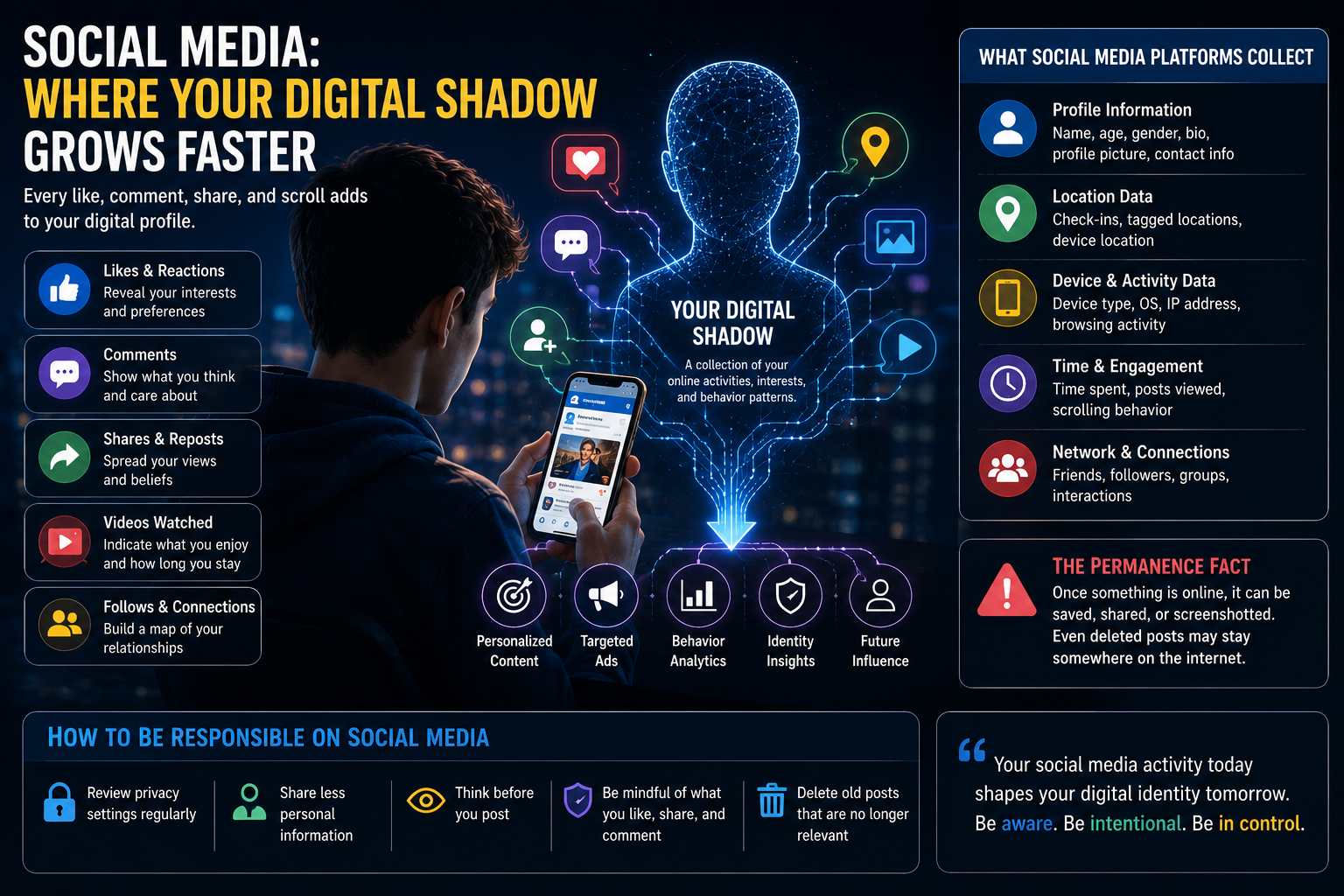
Social media platforms encourage people to share moments, opinions, photographs, interests, and daily experiences. These interactions help people stay connected, but they also contribute significantly to a person's Digital Shadow.
Every like, comment, follow, share, reaction, or video view becomes another signal about personal interests. Over time, these interactions help platforms understand what users enjoy reading, watching, and discussing. This information allows feeds to become increasingly personalized, presenting content that is more likely to capture attention.
Even passive activities contribute to this process. Watching an entire video, scrolling past certain topics quickly, or spending extra time reading a particular post can all provide useful behavioral insights. Unlike active sharing, these signals often go unnoticed because users never intentionally submit them.
Another important consideration is permanence. A post deleted today may disappear from a public profile, but screenshots, cached pages, or shared copies may continue circulating elsewhere. This is one reason digital experts often recommend thinking carefully before publishing personal information online.
Using social media responsibly does not require abandoning these platforms. Instead, it involves understanding that every interaction becomes part of a broader digital history that may influence future recommendations, advertising, and online experiences.
Public Wi-Fi and Shared Networks
Free internet access at airports, cafés, hotels, shopping malls, and public spaces has become a normal part of everyday life. While these networks provide convenience, they also deserve additional attention from a privacy perspective.
Public Wi-Fi networks often connect large numbers of unfamiliar devices simultaneously. Although many modern websites encrypt information using secure connections, users should still avoid performing sensitive activities such as online banking or entering confidential information on unsecured public networks whenever possible.
Simple precautions can significantly reduce risk:
- Verify that the Wi-Fi network is legitimate before connecting.
- Prefer websites that use secure HTTPS connections.
- Avoid accessing financial or highly sensitive accounts on unknown networks.
- Turn off automatic Wi-Fi connections when not needed.
- Log out of important accounts after using shared devices or networks.
These habits not only improve security but also help limit unnecessary exposure of your Digital Shadow in unfamiliar digital environments.
Can You Reduce Your Digital Shadow?
Completely eliminating a Digital Shadow is neither practical nor desirable. Modern digital services depend on information to function effectively. Online banking requires identity verification, navigation applications need location data, shopping websites remember purchases, and cloud platforms synchronize files across devices.
The objective, therefore, is not to disappear from the internet but to become more intentional about the information you choose to share.
Small habits can make a meaningful difference. Reviewing app permissions regularly ensures applications only access the information they genuinely need. Limiting unnecessary account registrations reduces the amount of personal data distributed across multiple services. Strong passwords combined with multi-factor authentication protect accounts from unauthorized access, while keeping browsers and operating systems updated improves overall security.
Privacy settings also deserve regular attention. Many online services provide options to control personalized advertising, location sharing, account visibility, and data retention. Spending a few minutes reviewing these settings can significantly improve transparency and user control.
Perhaps the most effective habit is simply developing greater awareness. Before clicking a link, downloading an application, granting a permission request, or sharing personal information, taking a brief moment to understand why the information is needed often leads to better digital decisions.
Managing your Digital Shadow is less about avoiding technology and more about using it wisely. Awareness, informed choices, and responsible digital habits allow people to enjoy the benefits of connected technology while maintaining greater control over their personal information.
Practical Privacy Habits for Everyday Users

Protecting your Digital Shadow does not require advanced technical knowledge or expensive security software. In most cases, consistent everyday habits are far more effective than complicated solutions. Small improvements, practiced regularly, can significantly strengthen both privacy and online security.
One of the simplest habits is reviewing app permissions before installing or updating an application. Many apps request access to features such as location, contacts, camera, microphone, or photo galleries. While some permissions are necessary for functionality, others may not be essential. Granting access only when required helps reduce unnecessary data collection.
Strong authentication is equally important. Using unique passwords for different accounts, combined with multi-factor authentication (MFA), makes it far more difficult for unauthorized users to gain access to personal information. Password managers can also help generate and securely store complex passwords without requiring users to remember each one.
Software updates should never be ignored. Browser updates, operating system patches, and application updates often include important security improvements that protect against newly discovered vulnerabilities. Keeping devices updated is one of the easiest ways to improve digital safety.
Privacy settings deserve regular attention as well. Most online platforms now provide options to control personalized advertisements, location history, activity tracking, account visibility, and data sharing. Spending a few minutes reviewing these settings every few months can provide greater control over your digital presence.
Most importantly, think before sharing. Every photo, document, opinion, location check-in, or personal detail published online becomes part of your growing Digital Shadow. Asking a simple question "Would I still be comfortable with this information a few years from now?" can prevent many future privacy concerns.
Simple Habits That Help Protect Your Digital Shadow
| Privacy Habit | Why It Matters |
|---|---|
| Review app permissions regularly | Limits unnecessary access to personal information |
| Use strong, unique passwords | Reduces the risk of unauthorized account access |
| Enable Multi-Factor Authentication (MFA) | Adds an extra layer of security |
| Keep software updated | Protects against known security vulnerabilities |
| Review browser privacy settings | Gives greater control over tracking and cookies |
| Be cautious on public Wi-Fi | Reduces exposure on unsecured networks |
| Think before posting personal information | Prevents unnecessary long-term digital exposure |
| Regularly check privacy settings | Keeps your data-sharing preferences up to date |
These habits do not eliminate your Digital Shadow, nor should they. Modern technology relies on responsible data sharing to deliver secure and personalized services. Instead, these practices help ensure that your digital presence reflects informed choices rather than accidental exposure.
Key Takeaways
- Every online activity contributes to your Digital Shadow, whether you notice it or not.
- Digital footprints are created through both intentional actions and automatic background processes.
- Cookies, analytics, browser fingerprinting, and online tracking help websites function but also expand your digital presence.
- Social media interactions can reveal interests and behavior patterns over time.
- Public Wi-Fi requires additional caution when handling sensitive information.
- Privacy is not about avoiding technology—it is about understanding how your information is used.
- Small habits like reviewing permissions, enabling multi-factor authentication, and updating privacy settings can significantly improve online security.
A Digital Shadow is the collection of information created through your online activities, including searches, website visits, app usage, purchases, and interactions across digital platforms.
They are closely related but not identical. A digital footprint usually refers to the information you create online, while a digital shadow emphasizes the broader collection of visible and invisible data generated through your digital interactions.
No. Some information must be retained for security, legal, or service-related purposes. However, you can reduce unnecessary data collection by adjusting privacy settings, limiting permissions, and practicing responsible online habits.
No. Many cookies are essential for website functionality, such as remembering login sessions or shopping carts. Others are used for analytics or personalized advertising, which users can often manage through cookie preferences.
Understanding your Digital Shadow helps you make informed decisions about privacy, security, and responsible technology use. Greater awareness allows you to enjoy digital services while maintaining better control over your personal information.